

Hyundai Smart Cruise Control: How It Works & When to Use It
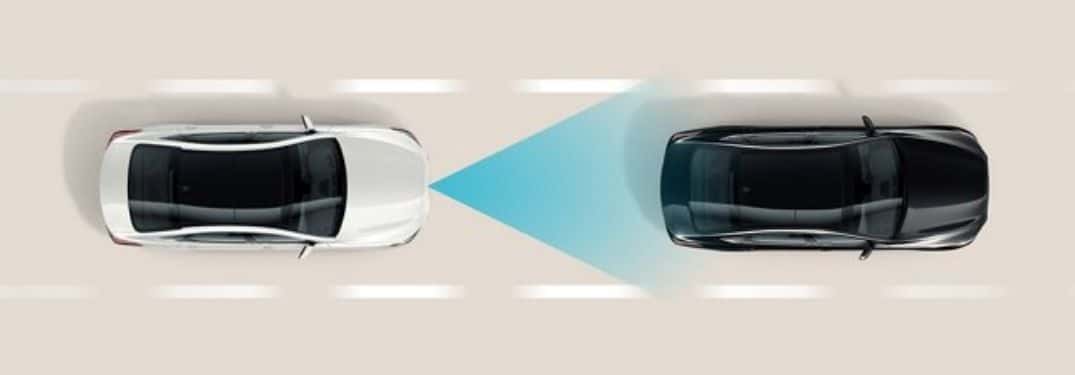
Heading down I-64 during rush hour means constantly tapping the brake and gas as traffic ebbs and flows. Your right leg starts to ache, and you’re mentally exhausted from the constant speed adjustments. Hyundai Smart Cruise Control (SCC) transforms this frustrating experience into something far more manageable. This intelligent system doesn’t just hold your speed like older cruise controls. It actually watches the road ahead, adjusts to surrounding traffic, and even brings your vehicle to a complete stop when needed.
What Is Hyundai Smart Cruise Control?
Hyundai Smart Cruise Control represents a significant leap forward in driver assistance technology. Unlike traditional systems that simply maintain a fixed speed, SCC combines speed control with active distance monitoring. When you activate the system, your Hyundai continuously tracks vehicles ahead while maintaining your chosen speed. If traffic slows, the vehicle automatically reduces speed to preserve a safe following distance. When the road clears, the system accelerates back to your preset speed without any input from you.
This technology really shines during long drives and unpredictable traffic patterns. Rather than manually adjusting your speed every few minutes, SCC handles these changes automatically. This technology proves especially valuable on routes where conditions shift frequently, like the transition from open highway to congested areas around Hampton Roads.
How SCC Differs From Traditional Cruise Control
Traditional cruise control maintains whatever speed you set until you brake or accelerate. Hyundai’s adaptive cruise control takes an entirely different approach by incorporating awareness of your surroundings. The system actively responds to vehicles ahead, adjusting your speed to match traffic flow.
| Feature | Traditional Cruise Control | Hyundai Smart Cruise Control (SCC) |
| Speed Maintenance | Maintains a fixed speed set by driver | Maintains speed and adjusts automatically based on traffic ahead |
| Following Distance | Not adjustable | Adjustable safe distance from the vehicle ahead |
| Stop & Go Capability | No | Yes, can bring vehicle to a complete stop and resume in traffic |
| Technology Used | Basic speed control | Radar and camera sensors for adaptive control |
| Integration | Standalone | Can integrate with Highway Driving Assist (HDA) |
The distinction becomes clear when you encounter slower-moving vehicles. With conventional cruise control, you’d brake manually, then reset your speed once you pass. Smart Cruise Control handles this automatically, slowing as you approach other vehicles and resuming your set speed once the lane clears.
How Hyundai Smart Cruise Control Works
The intelligence behind SCC comes from sophisticated sensor technology working continuously in the background. A forward-facing radar system sends out waves that bounce off vehicles ahead, measuring both distance and relative speed dozens of times per second. When sensors detect a vehicle slowing in your lane, the system reduces throttle input or applies gentle brake pressure to maintain your selected following distance.
The system operates seamlessly. You won’t experience harsh braking or sudden acceleration. Instead, the transitions feel smooth and predictable, mimicking how a skilled driver would naturally adjust speed in traffic.
Radar and Camera Technology
The radar sensor mounted in your Hyundai’s front fascia forms the foundation of the SCC system. This component constantly monitors the road ahead, detecting vehicles up to several hundred feet away. The camera system works alongside the radar, providing visual confirmation of lane markings and road conditions. Together, these technologies create a comprehensive picture of your driving environment.
This dual-sensor approach offers crucial redundancy. The camera excels at identifying lane markings on clear days, while the radar maintains effectiveness even in fog or light rain. This combination makes the system more reliable across varying weather and lighting conditions.
Maintaining Speed and Following Distance
When you engage SCC, you’ll select both a target speed and a preferred following distance. The system offers four adjustable distance levels, with level 1 being the shortest and level 4 the longest. Your Hyundai maintains this spacing automatically by adjusting throttle and brake inputs based on the vehicle ahead.
If the car in front accelerates beyond your set speed, your vehicle won’t try to keep pace. The system respects your maximum speed setting, preventing unintended acceleration. This balanced approach keeps you in control while reducing the mental workload of constant speed monitoring.
Smart Cruise Control With Stop & Go in Hampton Roads Traffic
The Stop & Go feature elevates Smart Cruise Control from convenient to transformative during Hampton Roads commutes. Anyone navigating I-64 or the Hampton Roads Bridge-Tunnel during peak hours knows the pattern: crawl forward, stop, wait, repeat. Smart Cruise Control with Stop & Go manages this cycle automatically. When traffic halts, your Hyundai comes to a complete stop and holds position. Once the vehicle ahead begins moving, your car resumes forward motion without requiring you to touch the accelerator.
This capability dramatically reduces the physical strain of stop-and-go traffic. Your right foot gets a break from the constant dance between brake and gas pedals. For daily commuters facing unpredictable traffic patterns around Virginia Beach, Norfolk, and Chesapeake, this feature transforms the driving experience entirely.
How SCC Connects to Highway Driving Assist
Smart Cruise Control reaches its full potential when paired with Highway Driving Assist (HDA). This integration creates a more comprehensive support system for highway travel. While SCC manages your speed and following distance, HDA adds gentle steering inputs to help keep your vehicle centered in its lane through lane centering technology. The two systems communicate constantly, coordinating their actions to maintain smooth, predictable vehicle behavior.
This combination proves particularly valuable during long highway stretches. The steering assistance subtly counteracts drift, reducing the small corrections you’d normally make to stay centered. Meanwhile, SCC handles all speed adjustments based on traffic flow. Both features are part of Hyundai SmartSense, the brand’s comprehensive suite of advanced driver assistance technologies.
How to Use Hyundai Smart Cruise Control
Operating Hyundai Smart Cruise Control requires just a few simple steps. Most Hyundai models place the cruise control buttons on the left side of the steering wheel, keeping these controls within easy reach while maintaining your grip. The interface typically includes buttons for power, set, resume, cancel, and distance adjustment.
Activating and Setting Your Speed
To activate SCC, follow these steps:
- Press the Driving Assist or Cruise Control button on your steering wheel
- Accelerate to your desired speed (above 20 mph)
- Press the Set button to lock in your speed
- Release the accelerator. SCC now maintains your speed and distance automatically
Your instrument cluster will display confirmation that SCC is active, typically showing your set speed and current following distance setting. You can adjust your set speed without deactivating the system using the plus and minus buttons, which change your target speed in small increments.
Adjusting Following Distance and Deactivating
The vehicle-to-vehicle distance button cycles through four distance settings, indicated by visual bars or numbers in your instrument display. Shorter distances work well in light traffic, while longer settings provide extra reaction time in dense traffic or adverse conditions.
To deactivate or adjust SCC:
- Press the brake pedal or pause button to temporarily disengage
- Use the resume button or manual acceleration to restart
- Press the Driving Assist/Cruise Control button again to turn off completely
When you want to temporarily suspend cruise control without erasing your settings, use the cancel button rather than the brake. This preserves your speed and distance preferences for quick reactivation.
SCC Limitations and Common Alerts
Despite its sophisticated capabilities, Smart Cruise Control has operational boundaries you should understand. The system’s reaction time, while impressively quick, isn’t instantaneous. Sudden changes in traffic require your immediate attention and intervention. The system may not detect vehicles cutting into your lane quickly enough to prevent close following situations.
Your instrument cluster will display alerts when SCC encounters situations it can’t handle properly. These warnings might indicate sensor obstruction, system malfunction, or conditions exceeding the system’s design parameters. Never ignore these alerts. They signal moments when you need to take full manual control of speed and following distance.
Weather, Curves, and Sensor Considerations
Heavy rain, snow, or fog can impair the radar and camera systems that enable SCC functionality. Water droplets or snow accumulation on sensors may trigger system deactivation or degraded performance. Salt air and sand common in coastal Virginia Beach driving conditions can affect sensor performance if they accumulate on the front fascia.
Sharp curves present another challenge. The system may briefly lose track of vehicles ahead as they disappear around bends, causing unnecessary acceleration before the road straightens. On winding roads with tight turns, we recommend deactivating SCC and using manual speed control instead. The technology works best on relatively straight highway sections where traffic flow remains visible to the forward-facing sensors.
Your Responsibility Behind the Wheel
Hyundai Smart Cruise Control and other SmartSense features enhance your driving experience, but they never replace your judgment and awareness. You must remain alert and ready to take control at any moment. Keep your hands on the wheel and your attention on the road, even when SCC is managing speed and distance. The system serves as an assistant, not an autopilot. It can’t predict sudden lane changes, recognize stopped vehicles in all situations, or navigate complex traffic scenarios requiring human judgment.
We can’t stress enough that drivers remain fully responsible for vehicle control at all times. Monitor your surroundings constantly, watching for vehicles entering your lane, debris on the road, or sudden changes in traffic flow that might require immediate braking beyond what the system provides.
Experience Smart Cruise Control at Checkered Flag Hyundai World
Discovering how Hyundai Smart Cruise Control enhances your driving starts with hands-on experience. At Checkered Flag Hyundai World, we invite you to test this technology on real roads facing actual Hampton Roads traffic conditions. Our team understands how SCC performs on local routes, from I-64 commutes to Beach Boulevard traffic patterns.
Schedule a Test Drive
Schedule a test drive to experience Smart Cruise Control with Stop & Go functionality during your typical commute scenarios. We can demonstrate these capabilities across different models, helping you find the right balance of features for your needs. Whether you’re considering a new Hyundai Tucson, Sonata, or any model equipped with Smart Cruise Control, we provide the expertise and inventory to support your decision.
Visit us at 3700 Sentara Way in Virginia Beach, contact our team at 757-497-7777, or reach out online to learn more about experiencing this technology firsthand.
0 comment(s) so far on Hyundai Smart Cruise Control: How It Works & When to Use It