

What is Hyundai Digital Key?
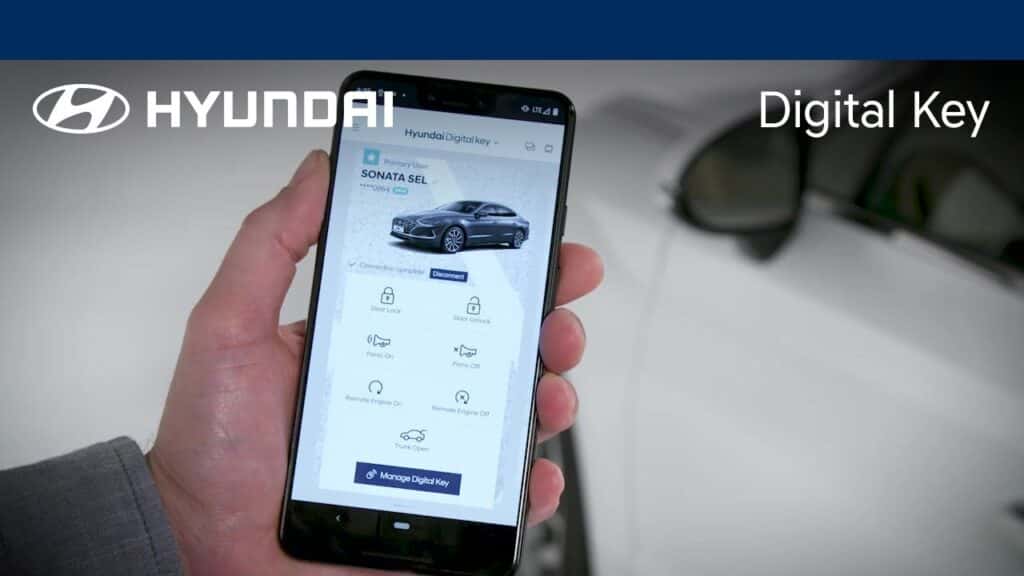
Your phone already handles your banking, your front door lock, and your boarding pass. It was only a matter of time before it took over your car key too. Hyundai’s Digital Key technology does exactly that, turning your smartphone into a fully functional vehicle key.
Whether you’re curious about how it works, which version your vehicle has, or whether your phone is compatible, this guide walks you through everything you need to know. If you’re ready to see it in person, browse our new Hyundai inventory to find current models equipped with Digital Key capability.
What Is Hyundai Digital Key? A Simple Explanation
Hyundai Digital Key is a smartphone-based system that replaces the traditional physical key fob. Using NFC and Bluetooth, your phone communicates directly and securely with your vehicle, letting you lock it, unlock it, and even start the engine without ever reaching into your pocket.
Once set up, the car recognizes your phone and responds to it just as it would to a conventional key. It’s a clean, modern solution that removes one more physical item from your daily routine, and it ties into the broader MyHyundai ecosystem for expanded remote control over your vehicle.
What You Can Do with Hyundai Digital Key
The core functions go well beyond simple entry. Lock and unlock your car, start the engine, manage access for multiple users, all from your phone. The system responds quickly when your device comes near the door handle, and it feels effortless in daily use.
One of the more practical features is the ability to share access with others. If you regularly share your car with a spouse, teenager, or friend, you can create individual digital key profiles and define exactly what each person can do. Some profiles support time restrictions, which is genuinely handy when you’re lending the car temporarily. The MyHyundai app serves as the central hub for all of this, keeping you in control of who has access and when.
Hyundai Digital Key 1 vs. Digital Key 2: Understanding the Difference
Not all Hyundai Digital Key versions are created equal. Depending on when your vehicle was built and what trim level you have, you may be working with either Digital Key 1 or the more advanced Digital Key 2. Knowing the difference helps you understand exactly what your system can do.
Digital Key 1: Android-Focused Access
Digital Key 1 is available for compatible Android devices via the Google Play Store. It relies on NFC, which means you physically tap your phone against the driver’s door handle to unlock the vehicle. Setup involves pairing the phone to the vehicle via Bluetooth and registering through the app. For a single driver or small household, it gets the job done reliably.
Digital Key 2: Expanded Device Compatibility
Digital Key 2 is a meaningful improvement. It works with select Samsung, Google, and Apple devices, and stores the digital key in Samsung Wallet, Google Wallet, or Apple Wallet. It also supports compatible smartwatches, making it a more versatile option for households with a mix of devices.
Digital Key 2 Touch covers NFC-only devices, still requiring a tap to unlock. Digital Key 2 Premium goes further by adding ultra-wideband (UWB) technology for passive entry, meaning the vehicle automatically unlocks when your phone is detected nearby with no tap required. Digital Key 2 Premium is available on select 2024 and 2025 models and represents Hyundai’s most complete Digital Key implementation.
How to Set Up Hyundai Digital Key
Getting started takes only a few minutes. The process is consistent across versions, though the specific app or wallet used will vary depending on which version your vehicle supports.
- Download the MyHyundai with Bluelink app from the Google Play Store or Apple App Store, then confirm your Samsung Wallet, Google Wallet, or Apple Wallet is set up on your device if you are using Digital Key 2.
- Open the app and sign in to your MyHyundai account.
- Follow the in-app prompts to pair your phone with your vehicle via Bluetooth.
- Register your device as the primary key within the app.
- Test the connection by tapping your phone to the driver’s door handle to confirm NFC unlock is working.
For active use, your phone needs to be unlocked. However, if your iPhone, Samsung, or Google Pixel battery runs out completely, the system can still function for approximately 2 to 3 hours using the phone’s power reserve, depending on your device model. Charging as soon as possible is still recommended.
Which Smartphones and Devices Are Compatible with Digital Key
Compatibility is one of the first questions people ask, and it’s worth getting specific. Digital Key 1 supports compatible Android devices only. Digital Key 2 expands that to include select Samsung, Google, and Apple devices, as well as compatible smartwatches. Digital Key 2 Premium adds UWB passive entry on top of that full device range.
The table below breaks down compatibility across all three versions:
| Feature | Digital Key 1 | Digital Key 2 | Digital Key 2 Premium |
|---|---|---|---|
| Android | Yes | Yes | Yes |
| Apple | No | Yes | Yes |
| Samsung | No | Yes | Yes |
| No | Yes | Yes | |
| Smartwatch Support | No | Yes | Yes |
| Passive Entry (UWB) | No | No | Yes |
A note on the Android row: Digital Key 1 supports compatible Android devices broadly. Digital Key 2 and Digital Key 2 Premium narrow that down to select Samsung and Google Pixel devices specifically, not all Android phones. Not every device within those brands qualifies automatically.
Check the MyHyundai with Bluelink app’s compatibility list or confirm with our team before assuming full functionality on your specific model. If you’d like to experience how Digital Key works before you buy, schedule a test drive at Checkered Flag Hyundai World.
Which Hyundai Models Support Digital Key
Digital Key functionality spans several recent model years, with availability depending on the specific model, model year, and trim level. The Sonata was the first Hyundai vehicle to feature Digital Key capability, and the feature has since expanded across the lineup.
Digital Key 2 Premium is compatible with select 2024 and 2025 Sonata, Santa Fe, IONIQ 5, Tucson, and Palisade models. If you’re shopping specifically for this feature, confirm which version is included on the exact trim you’re considering, since availability can vary even within the same model.
How to Share Your Hyundai Digital Key with Family or Friends
Sharing your Hyundai Digital Key is one of its most practical advantages, especially for Virginia Beach families managing multiple drivers and one vehicle. No physical key to duplicate, no need to hand anything over in person. The whole process happens digitally through Samsung Pass, Google Wallet, or Apple Wallet for Digital Key 2 users.
You can share access with up to 3 people. Here’s how it works:
- Open the MyHyundai with Bluelink app or the relevant wallet app on your phone.
- Select the option to share your digital key.
- Choose the contact you want to share with and enter their information.
- Set any usage restrictions, such as time limits or access windows, if needed.
- Send the key. The recipient receives it on their compatible device.
To revoke access, return to the app and remove that person’s key. It takes effect immediately and doesn’t require anyone to be physically present. Primary users retain full control at all times.
Is Hyundai Digital Key Safe to Use?
Security is a fair concern when your phone becomes your car key. Hyundai addresses this through encryption, secure communication protocols, and proximity-based validation. The NFC system requires your phone to be physically close to the car, which limits the window for any interception attempt. UWB technology in Digital Key 2 Premium takes this further by precisely measuring distance, so the vehicle only responds when your device is genuinely nearby.
Your digital key is stored in a secure, encrypted wallet app (Samsung Wallet, Google Wallet, or Apple Wallet), and your phone must be unlocked for the system to function, which adds another layer of protection. Lose your phone? You can revoke the key remotely through the MyHyundai platform. Shared access profiles can be monitored and adjusted at any time, so you’re never in the dark about who has access to your vehicle.
Find a Hyundai with Digital Key at Checkered Flag Hyundai World
If you’re shopping for a Hyundai with Digital Key capability in Virginia Beach, our team at Checkered Flag Hyundai World can confirm which models on our lot include the feature and which version they support. Not every trim comes equipped the same way, and we’d rather you know exactly what you’re getting before you make a decision.
We’re happy to answer questions about device compatibility, walk you through how the system works on a specific vehicle, or help you find the right model for your needs. Reach out to our team and we’ll point you in the right direction.
0 comment(s) so far on What is Hyundai Digital Key?